


How to Customize T-Shirts: A Complete Guide for Businesses, Events & Creators
Whether you're shopping for blank bags, premium apparel, stylish hats, bulk quantities, or fully customized printing and embroidery, BagzDepot delivers fast, affordable, and high-quality solutions — trusted by 200,000+ customers nationwide.
Request a Custom Quote →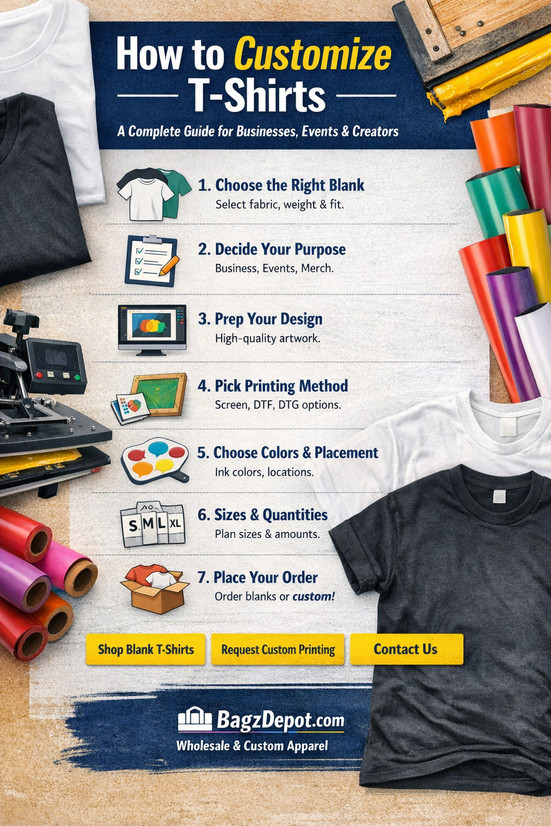
Custom T-shirts are one of the most effective ways to promote a brand, unify a team, or create merch people actually want to wear. This guide walks you through everything—from choosing the right blank tee to picking the best printing method—so your finished shirts look professional and last.
Step 1: Choose the Right Blank T-Shirt
Every great custom tee starts with the right blank. The fabric, weight, and fit will affect how your design prints, how the shirt feels, and how often people wear it. If you’re printing for an event, choose comfort and durability. If you’re building merch for resale, prioritize premium feel and consistent sizing.
Pick Your Fabric
- 100% Cotton: Classic feel, breathable, and excellent for most printing methods.
- Cotton/Poly Blend: Soft, durable, and tends to hold shape well with less wrinkling.
- Tri-Blend: Ultra-soft and lightweight—perfect for retail-style merch.
Choose the Right Weight
- Lightweight: Great for warm weather, events, and casual wear.
- Midweight: The most versatile option for everyday use.
- Heavyweight: Premium feel, durable, and often preferred for workwear.
Ready to choose your blank? Browse BagzDepot’s Wholesale T-Shirts and Wholesale Apparel collections.
Step 2: Decide What You’re Printing For
The purpose of your shirts should guide everything—blank selection, artwork style, print method, and quantities. Here are the most common use cases:
- Business Branding: Staff uniforms, giveaways, onboarding kits, trade shows.
- Events: Runs, festivals, conferences, family reunions.
- Fundraisers: Schools, churches, nonprofits, and team causes.
- Merch: Creator merch, boutique drops, club or gym apparel.
If you’re not sure what blanks or printing method best matches your goal, you can contact BagzDepot for help.
Step 3: Create (or Prep) Your Design the Right Way
Great printing starts with proper artwork. Even a simple logo can look messy if the file isn’t prepared correctly. Here’s what to aim for:
Best File Types
- Vector files: AI, EPS, PDF (best for crisp logos and scalable designs)
- High-resolution images: PNG, JPG (preferably 300 DPI at print size)
- Transparent background: PNG recommended for many designs
Design Tips That Always Work
- Keep it readable: If it’s hard to read from 6–10 feet away, simplify it.
- Use high contrast: Light ink on dark shirts (or vice versa) prints clearer.
- Don’t overcrowd: Clean designs look more premium and wear better.
- Mind the placement: Center chest, left chest, full front, full back, sleeve—all change the vibe.
Step 4: Pick the Best Printing Method
The “best” method depends on your quantity, design complexity, and budget. Below is a simple breakdown to help you choose:
Screen Printing
Best for bulk orders and simple designs (like logos or 1–3 color prints). It’s durable and cost-effective at higher quantities.
- Ideal for: Businesses, events, team shirts, giveaways
- Pros: Long-lasting, great color saturation, lower cost per shirt in bulk
- Considerations: Setup is required, so it’s best when ordering more pieces
DTF (Direct-to-Film)
Great for full-color designs, gradients, and smaller runs. DTF works on many fabric types and can produce vibrant detail.
- Ideal for: Detailed artwork, small-to-mid quantity orders
- Pros: Full color, sharp detail, flexible ordering
- Considerations: Feel can be slightly heavier depending on design coverage
DTG (Direct-to-Garment)
Best for high-detail prints on cotton. DTG is like printing directly onto the shirt—excellent for photo-like designs.
- Ideal for: Complex artwork and smaller runs on cotton
- Pros: Great detail and gradients
- Considerations: Works best on certain fabrics and colors
Not sure which method fits your project? Use our quote form and we’ll help you select the best option: Request a Custom Quote.
Step 5: Choose Ink Colors, Placement & Add-Ons
Small choices—like print location or ink color—can make your shirts look “basic” or “brand-level.” Decide these details before production so your order turns out exactly how you pictured it.
Most Popular Print Placements
- Left Chest: Clean and professional (great for uniforms)
- Full Front: Bold and attention-grabbing (great for events and merch)
- Full Back: Perfect for sponsors, large graphics, or team branding
- Sleeve: A premium add-on that feels custom and subtle
Add-On Ideas
- Names / Numbers: Teams, staff, events
- Multiple Locations: Front + back, or chest + sleeve
- Specialty Finishes: Ask for options depending on your design
Step 6: Get Sizes, Quantities & Timelines Right
Before placing your order, lock in your size breakdown and count. For groups, it’s smart to collect sizes using a quick form. A common approach is to order a balanced mix of sizes with a few extras in the most popular ones.
Quick Sizing Tips
- Ask if your group wants a standard unisex fit or fitted styles.
- If you’re unsure, consider ordering a range and avoiding extremes unless requested.
- For merch, consider offering unisex plus an optional women’s fit for better conversions.
Step 7: Place Your Order (Blank or Custom)
Whether you need plain blanks for your own printing or fully custom printed shirts ready to hand out, BagzDepot can help. Start with the option that matches your goal:
FAQ: Custom T-Shirts
What’s the best customization method for bulk orders?
For bulk orders with simple designs (like logos and text), screen printing is often the most cost-effective and durable option. For detailed, full-color designs, DTF can be a great fit.
What file do I need to send for custom printing?
Vector files (AI, EPS, PDF) are best. If you only have a PNG/JPG, aim for high resolution (ideally 300 DPI at the size you want printed).
Can you help if I’m not sure what to order?
Yes—just reach out and we’ll guide you on blanks, print methods, placement, and quantity. Contact us here.
Description
Promotional Bags Tips & Resources
-

Cotton Bags With Your Logo Printed: The Smart, Eco-Friendly Way to Promote Your Brand
Feb 04, 2026Looking for a practical promo item people actually keep and reuse? Cotton bags with logo printing a
Description
-
Conference Bags, Apparel & Hats With Your Logo: A Complete Branding Guide for Events
Jan 29, 2026Planning a conference, convention, or trade show? The right branded swag can turn attendees into wa
Description
-

How to Start a T-Shirt Business in 2026 the Right Way (Step-by-Step Guide)
Jan 28, 2026How To Start A T-Shirt Business In 2026 (The Right Way) Starting a t-shirt business in 2026 is stil
Description
- Read more articles